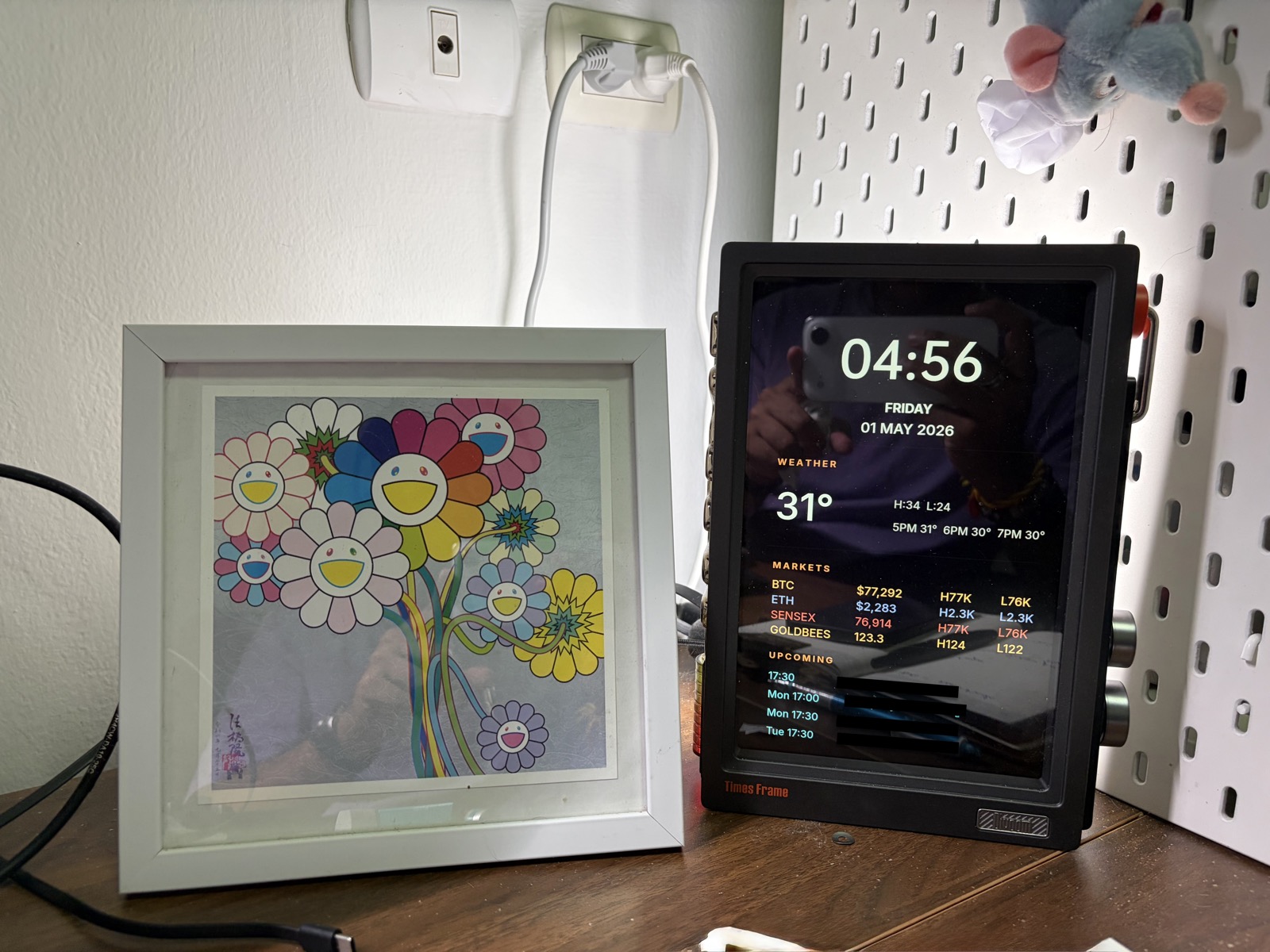
I have a Divoom TimeFrame on my desk — a small LED panel with a few dozen built-in clock faces. Analog, digital, retro pixel, weather widget, a stocks ticker. Not one of them showed the combination of things I actually wanted to see: time, weather, a couple of markets, and my next calendar events, all on one screen, calm and readable.
It got worse the closer I looked. The clock-face library treats data sources as mutually exclusive — I could have stocks or weather on a face, never both. The calendar integration supported exactly one Google account; I wanted events merged from four. There was no face that was even close to what I wanted, and no way to mix-and-match the modules on the ones that existed.
The device has an API. I figured: I’ll just build my own face.
The First Attempt
The API docs were rough. Sparse, partly machine-translated, with examples that didn’t quite match the field names. I did the obvious thing — scraped the docs, fed them to Claude Code, and asked it to build the dashboard.
It did not go well. Round after round, the agent produced code that compiled, ran, and pushed something to the device — and the something was always wrong in a new way. Misaligned, wrong sizes, things overlapping. My descriptions in chat (“the time block is too low, the markets section is bunched up”) were a useless substitute for vision; every iteration was the agent guessing at a target it couldn’t perceive.
So I stopped describing things in chat and tried something else.
The Fix: Give the Agent a Target and a Way to See
I drew a wireframe — a single PNG showing exactly what I wanted the panel to look like — and saved it in the project directory. That became the spec. Not a description. A file.
Then I needed to give the agent eyes. A local render isn’t enough; what the agent renders to disk is not what the actual panel shows after the device’s own scaling and color response have had their way with it. I needed it to grade its work against physical reality, not against its own output.
So I pointed a webcam at the panel.
This is where it got interesting.
Bridging the Permission Boundary
macOS won’t grant camera permission to a sandboxed agent process. The OS sees the agent as a child of a harness that doesn’t have camera access, and there’s no path to ask for one. I tried. There’s no path.
I solved it with a five-line shell script running in a regular Terminal window. Terminal has camera permission. The script polls for a file at /tmp/snap-request, and when it appears, takes a photo with imagesnap, writes the image to /tmp/snap.jpg, and touches /tmp/snap-ready to signal it’s done.
The agent doesn’t know anything about the camera. It can’t see the camera. It just does this:
rm -f /tmp/snap-ready /tmp/snap.jpg
touch /tmp/snap-request
# wait for /tmp/snap-ready
# read /tmp/snap.jpg
The filesystem is the API. The daemon is a privileged proxy.
This pattern generalizes well beyond cameras. Any time you want an agent to do something the host won’t let it do directly — touch hardware, use credentials you’d rather not put in its environment, run a privileged command — you can put a trusted daemon between them with files as the mailbox. The agent stays sandboxed. The daemon does the dangerous part. They meet at a path on disk.
One File the Agent Could Safely Edit
The third piece was about not letting the agent break things while it iterated.
I separated the project into two parts. A renderer that draws text and rectangles. A layout file with all the constants — coordinates, font sizes, colors, spacing. The renderer reads from the layout file; it never hardcodes a number.
The agent only edits the layout file. It cannot break the renderer because it never touches it. The worst case for any iteration is that a number ends up in the wrong place — never that drawing logic gets corrupted.
This is the unglamorous structural choice that made the loop safe. Without it, every iteration would have been Russian roulette with the agent’s diff.
The Loop
With those three pieces in place — wireframe, webcam, one editable file — the loop runs itself:
- Agent reads the wireframe.
- Agent reads the layout file.
- Agent edits a few constants.
- Device fetches the new render.
- Agent triggers a snap.
- Agent compares the photo to the wireframe.
- Agent decides what to change next.
Repeat until the panel matches.
I started it and went to make coffee. Came back to a panel that looked like the design.
What the Agent Figured Out on Its Own
Early snaps had a warm color cast that didn’t match the wireframe. The agent kept tweaking the color constants trying to match it. Eventually it worked out — and wrote down — that the camera was lying about color, and that the right move was to compare structure (positions, sizes, alignment) and trust the wireframe for color. It dropped color-matching from the loop on its own.
That wasn’t something I told it. It came from having eyes on the real device and being able to reason about what they were and weren’t showing.
What Changed
The first approach failed because the agent was writing code without being able to see the result. More prompts, better docs, clearer descriptions — none of those were going to fix it. The bottleneck wasn’t the agent’s reasoning or the docs’ quality. It was perception.
Once I closed that gap, the same agent that had failed dozens of times converged on a working layout in one unattended session.
What This Taught Me
The wireframe taught me that an agent does better against an artifact than a description. Chat is a moving target; a file isn’t.
The webcam taught me that perception is often the bottleneck people mistake for reasoning. The agent wasn’t dumb in the first attempt — it was blind. A permission bridge between the sandbox and the real world fixed more than better prompting ever could.
The one-file edit surface taught me that giving an agent room to iterate is mostly about giving it a place where iteration is cheap and safe. If a bad edit can break the system, you can’t run an unattended loop.
The TimeFrame is just the excuse. The pattern is the thing.